

Your Account. Your Phone.
Markets, predictions, signals, wallets and team management in a native Android app with biometric lock and in-app verification. Download it straight from Gold AH.
Android 8.0+FreeSigned by Gold AH
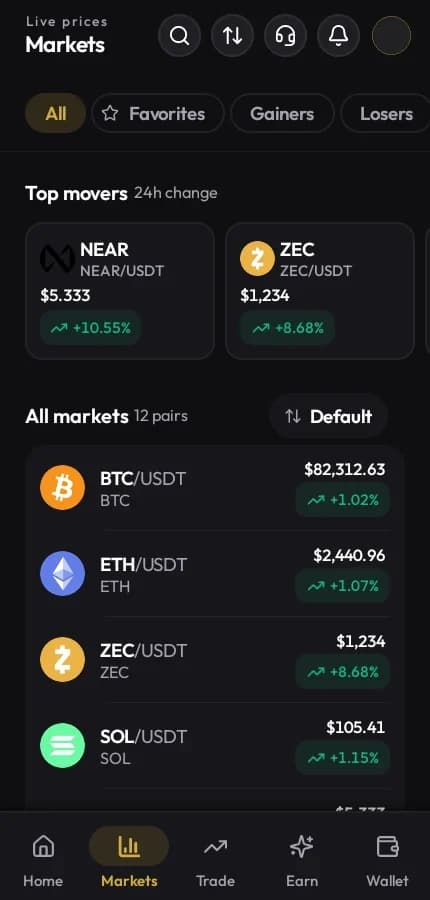
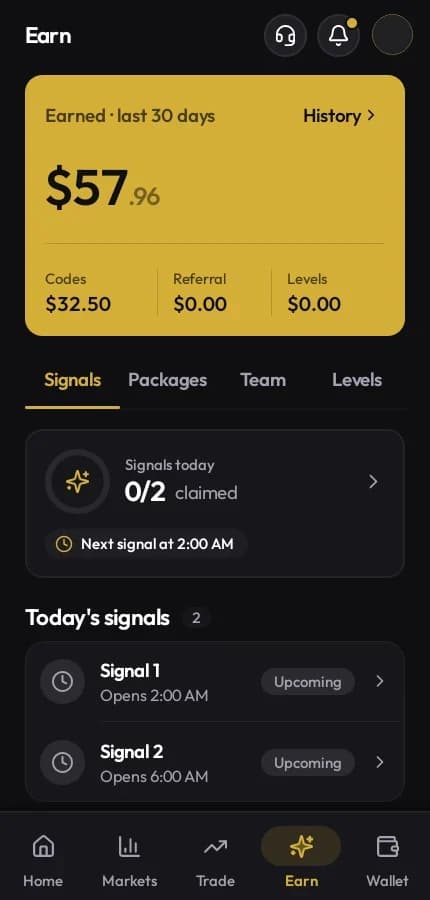
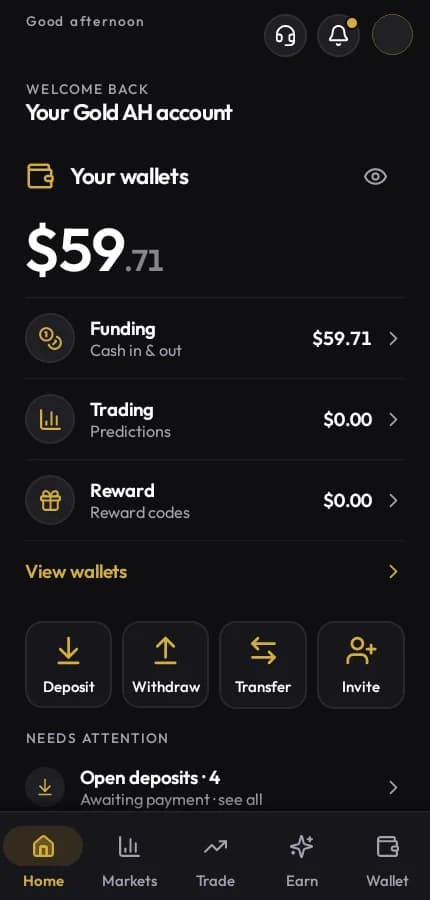
One App. Everything Connected.
Markets, predictions, signals, wallets, team management and rewards — all working through one Gold AH account on your phone.
Dashboard
Funding, Trading and Reward wallet balances at a glance, with deposit, withdraw, transfer and invite shortcuts.
Live Markets
Real-time prices with 24-hour change, top movers, favourites, gainers and losers across all supported pairs.
Predictions
Structured price-direction rounds from 5 minutes to 1 hour, with open positions and full trade history.
Signals & Packages
Daily signal codes with live countdowns, active package details, and reward-code claim status.
Wallet Management
Deposits, withdrawals, inter-wallet transfers and a complete transaction ledger with detail view.
Team & Referrals
Invite link, team growth, referral earnings and VIP level progression in one place.
Engineered for Speed. Crafted for Control.
Built with precision components: sub-millisecond market depth, confidence-rated signals, progression metrics, and segregated ledger vaults.
Real-Time Price & Depth
Sub-millisecond quote feeds with instant buy/sell execution.
Deterministic Signals
Daily reward releases with verified confidence metrics and instant claims.
Team & Tier Growth
Hierarchical ltree referral tracking with instant commission rebates.
Triple-Vault Architecture
Funding, trading, and reward wallets segregated with immutable accounting.
More Than the Website in a Smaller Window.
The app uses what your phone can do: biometrics, camera verification and a private app switcher.
- Biometric app lock
- Lock Gold AH behind your fingerprint or face, on top of two-step sign-in.
- In-app verification
- Photograph your ID and complete the face scan for KYC without leaving the app.
- Private app switcher
- Balances are hidden from the app switcher preview on your phone.
- Notification inbox
- Deposit, withdrawal, reward and account notices in one place.
- In-app support
- Contact Gold AH support directly from inside the app.
- Update prompts
- The app checks goldah.trade for new releases and notifies you when an update is available.
Latest Release. Straight from Gold AH.
Version, size, checksum and release notes come from the release server. Download on your phone or scan the code from a computer.
Latest release
Checking the latest Android release…
Sideloading, Step by Step.
Because the app comes from this site rather than a store, Android asks for one extra permission the first time.
- Android
- 8.0 (Oreo) or newer
- Processor
- ARM, 64-bit or 32-bit
- Connection
- Internet for live data
- Price
- Free
- 01
Download the APK
Tap Download APK on your phone, or scan the QR code from a computer.
- 02
Verify the SHA-256
Compare the downloaded file's checksum with the one shown in the download section. If it differs, delete the file.
- 03
Allow the install
Android asks to let your browser install unknown apps. Allow it once, then switch it off again afterwards.
- 04
Install and sign in
Open the downloaded file, tap Install, and sign in with your existing Gold AH account.
Three Rules for a Safe Install.
Sideloading is safe when the file is genuine. These keep it that way.
- 01
The only official source is goldah.trade. Gold AH never sends the APK by message, email or chat.
- 02
Every release is signed with the same Gold AH key, so updates install over the previous version. Android refuses an update signed by anyone else.
- 03
Turn on two-step sign-in and app lock after your first sign-in.
Before You Install, the Usual Questions.
Devices, updates and what carries over from the web.
Is there an iPhone app?
Not yet. On iPhone, iPad and computers, use Gold AH in your browser. It is the same account.
Why isn't it on Google Play?
Gold AH publishes the Android app directly on goldah.trade. The SHA-256 on this page lets you confirm you have exactly the published file.
Will my balances and history be there?
Yes. The app reads the same account records as the website, so wallets, positions and history match.
How do updates work?
The app tells you when a newer version is available. Download it from this page and install it over the current one. Your account and settings stay.
Android says the app is from an unknown source. Is that normal?
Yes, Android shows that for any app installed outside a store. Install only if the file came from goldah.trade and its checksum matches.
My phone is too old. What can I do?
The app needs Android 8.0 or newer. On older devices, Gold AH works fully in the browser.

Use Gold AH in Your Browser.
iPhone, iPad or computer: the same account works on the web.